Ona Automations
Trigger-based workflows that blend AI reasoning with deterministic execution, unlocking parallel changes across 1,000 repositories from a single engineer.
Lead Product Designer · Shipped November 19, 2025
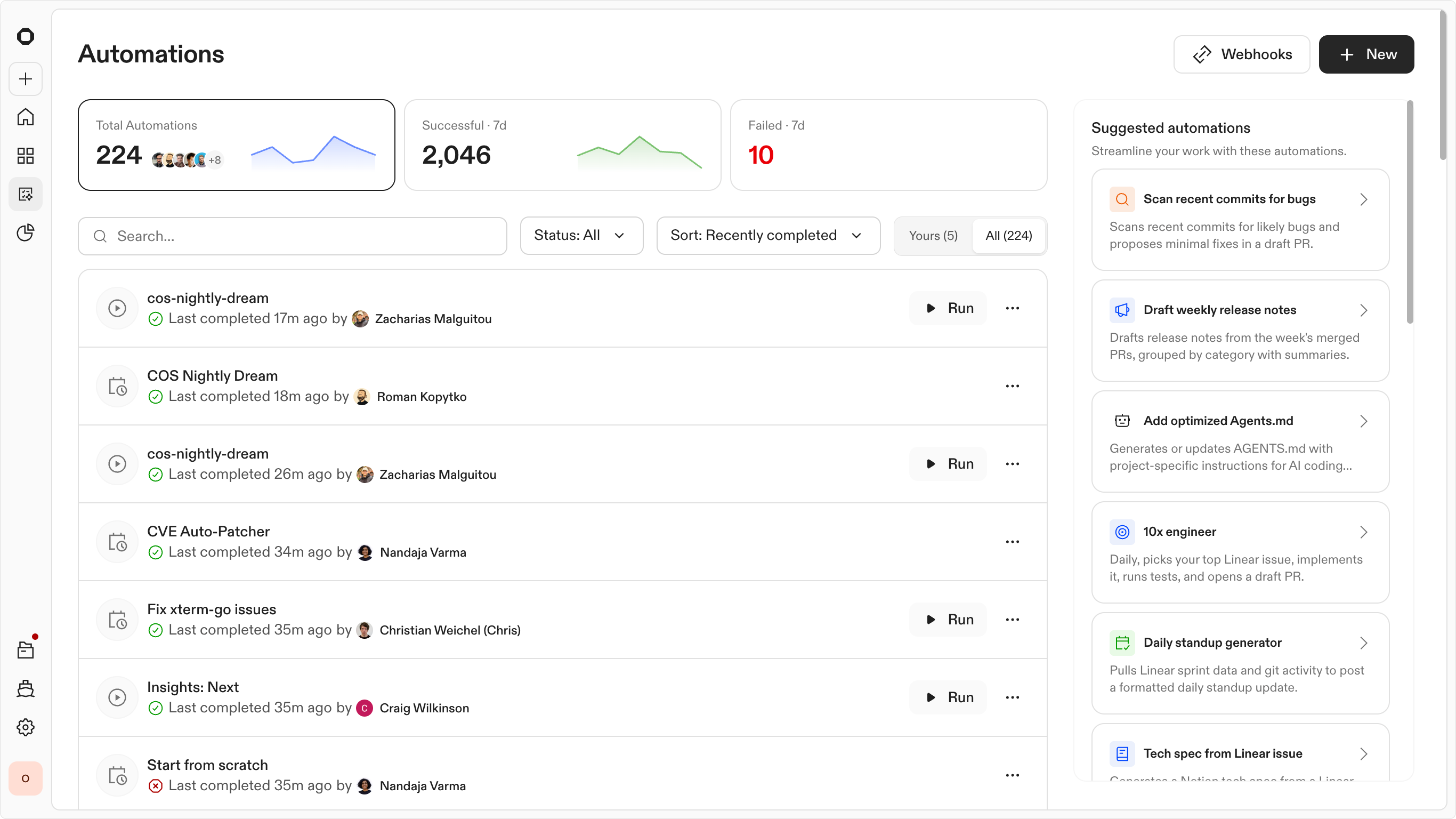
Automations transformed how the engineering organization managed global changes, moving from manual, repo-by-repo updates to a continuous background execution model.
Outcomes
The problem
By 2025, AI was good at generating code. You could hand a ticket to an agent, get a fix, and ship a PR in minutes. Distributing that fix across 500 repos was still a manual problem.
Teams were losing months to work that was technically simple but logistically cumbersome. They had the fix for a critical vulnerability or a library migration, but getting that change across hundreds of repos remained a manual process. This meant chasing down individual repo owners, babysitting CI pipelines, and managing the rollout in Linear or Jira. The same story played out with dependency bumps, compliance fixes, and security patches. Solved problems that were just expensive to ship everywhere.
This came up in nearly every customer conversation. Blackstone, Kingland, and Roche all described the same friction.
A great example of this is a company migrating from Node 22 to Node 24. For one repo the effort takes an afternoon, but expand that to 100 repos and the real cost appears. You have to update each repo, validate that nothing broke, and track what is done versus what still needs attention. That is months of engineering time spent on work nobody wants to do.
This pointed to an opportunity. Instead of focusing only on finishing one task, we could let engineers define a change once and have it run across their whole codebase. This removes the repetitive work and frees engineering teams up to solve bigger problems. All by enabling Agents to start changing how the entire team operates.
The approach
The Framework: Trigger, Context, Steps, and Report
The challenge was moving from a chat interface to a structured execution experience. To make this work at scale, I had to move away from the "black box" of a conversation and define a predictable lifecycle for an automation. I broke this down into a four-stage framework:
Designing the product
When you are looking to push a change across 10 to 1,000+ repos, a prompt component is the wrong experience. Automations needed a customizable workflow builder that could support both deterministic and non-deterministic steps. Something that could adapt to what happens mid-run while still reaching the same outcome, with a human able to step in at any point.
Other products have tackled sequential workflow experiences in ways that served as useful references. GitHub Actions, n8n, and Dagster each showed how structured pipelines could scale without losing flexibility. They also helped surface the gaps where background agents could genuinely add something those tools don't cover.
With those requirements and that market context, a clearer product direction came into focus.
The Automation Builder
Building an automation can be a complex workflow. As a user you would need to think systematically about how Ona should be triggered and what actions the agent should take across the specific resources you provided. This changes how we need to think fundamentally. It needs to be more deterministic than a standard agent conversational experience.
I didn't adhere to a specific method during the exploration phase, but typically, each day I designed a complete set of screens and rapid prototypes. During this process, I experimented with different types of workflow, node maps, complex conversation paradigms, and then linked the screens together as a working prototype to assess their functionality.
Through this process, I generated hundreds of screens and was able to narrow down a few major directions that resonated most. Around this time, I began sharing the screens with other people within the company and some customers to gather feedback and additional insights.
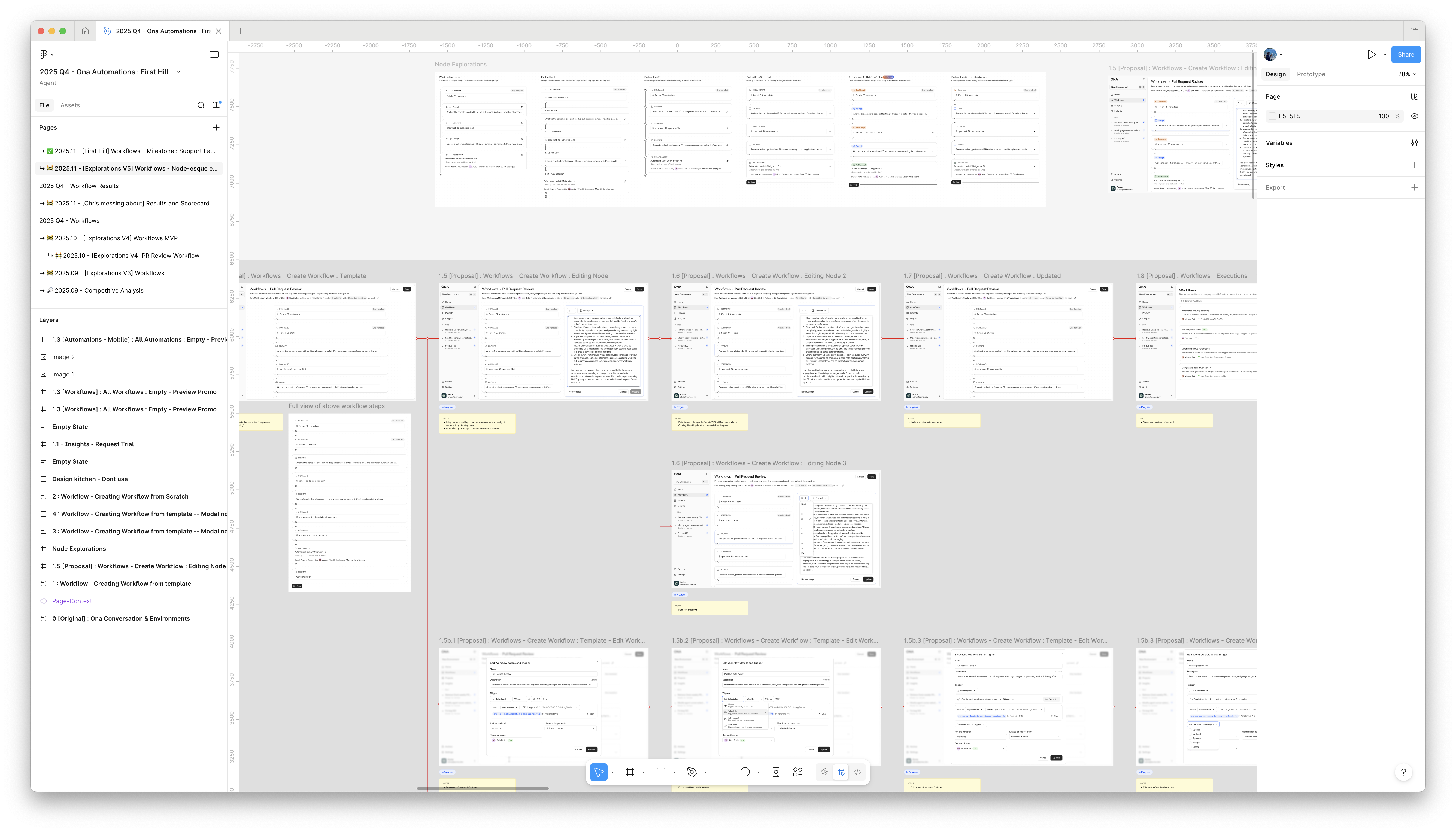
Exploration screens and rapid prototypes from the design process
Ultimately, I focused in on node maps. This type of experience would allow users to see how the automation will work and fine tune it to their needs. Here they could choose when Ona can trigger an automation (scheduled, manual, webhook), when an Ona loop or non-deterministic solution is needed, when a script is needed, and at what point to either kill an automation or push a change for review.
Working with this type of component also ensured we could create a calm and empowering experience that never feels like a black box, but more of an unlock.
Automations home — template library and active automations
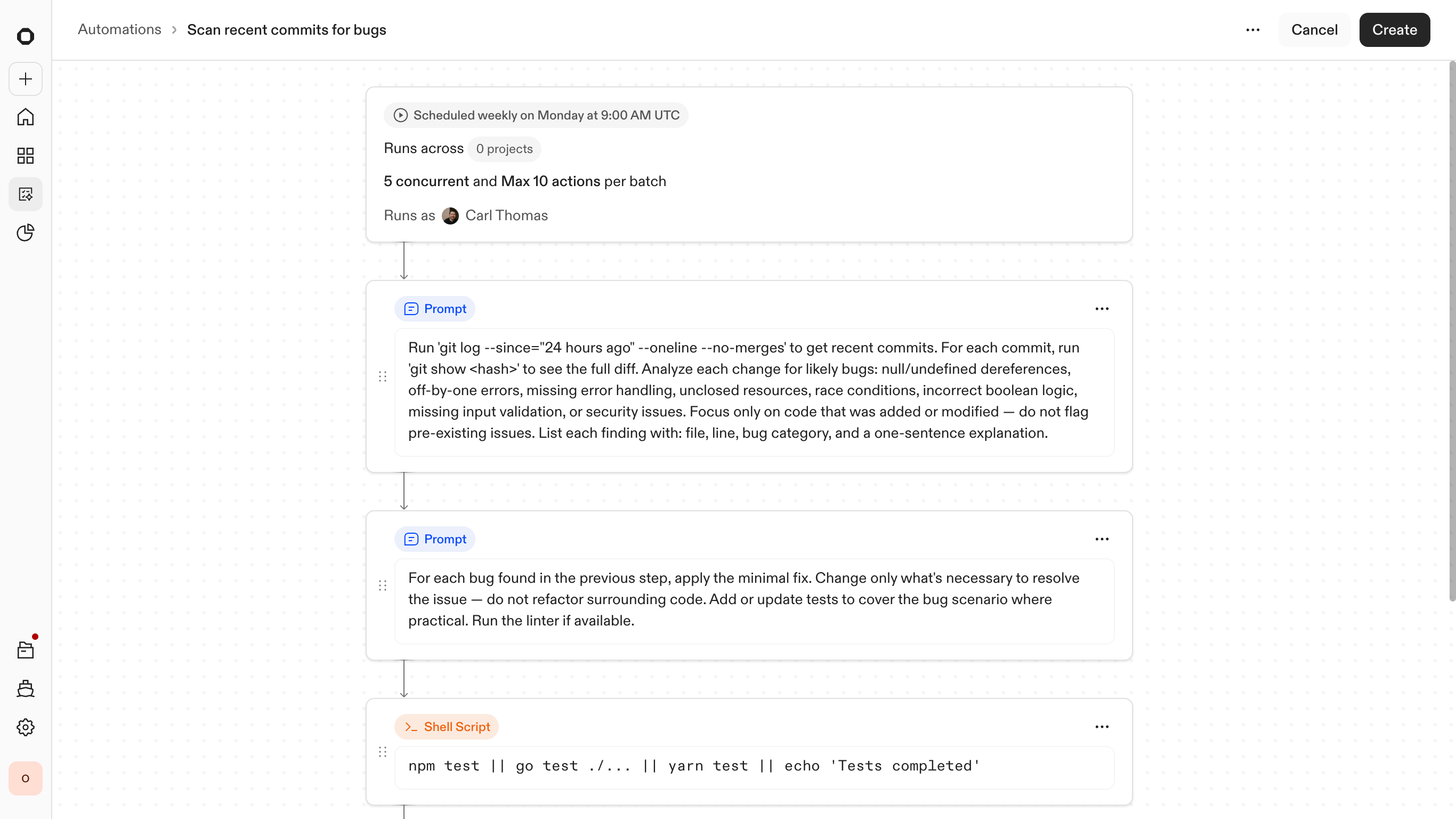
Starting a new automation from a template or blank canvas
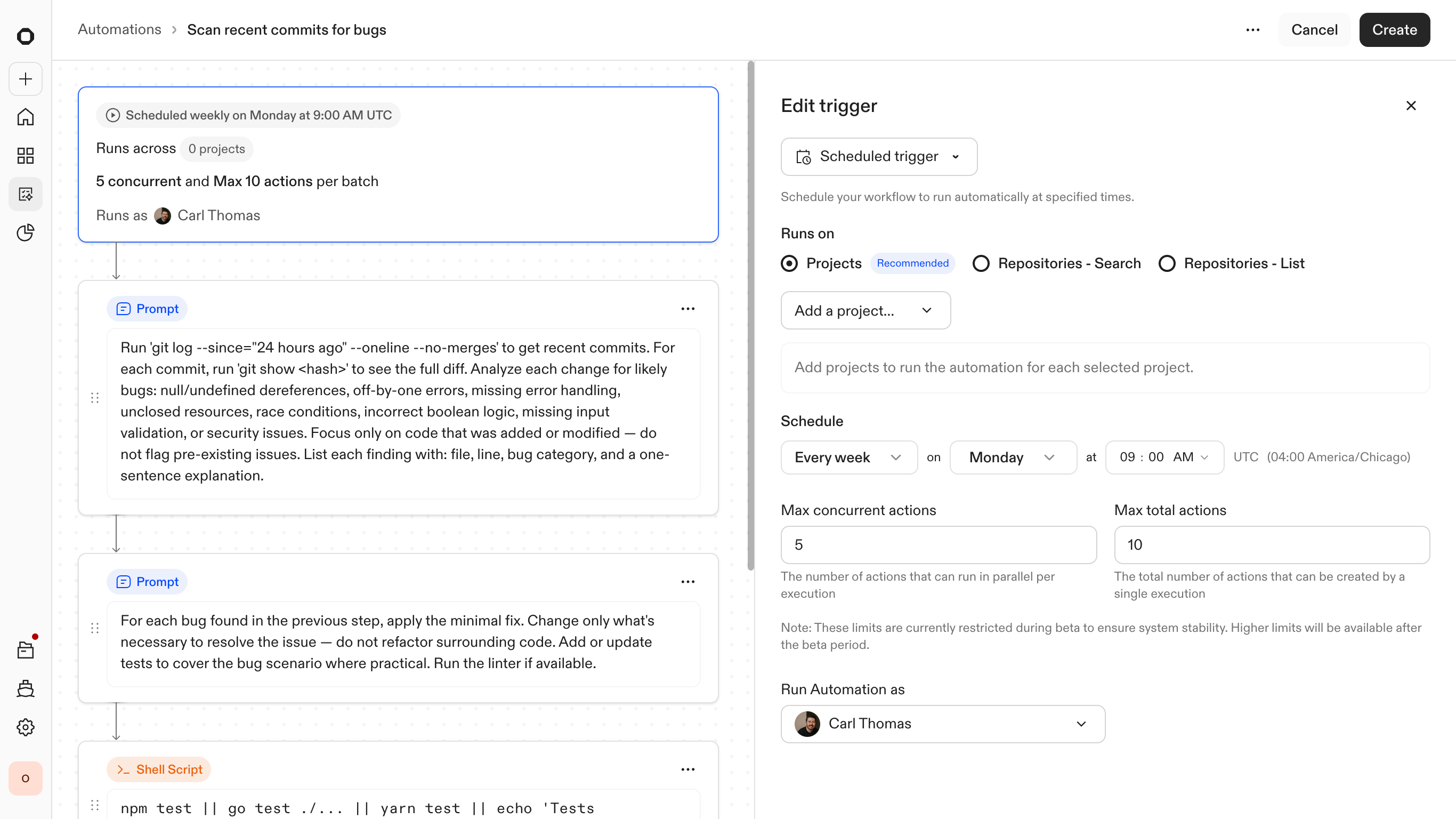
Defining the trigger — the event or condition that starts the automation
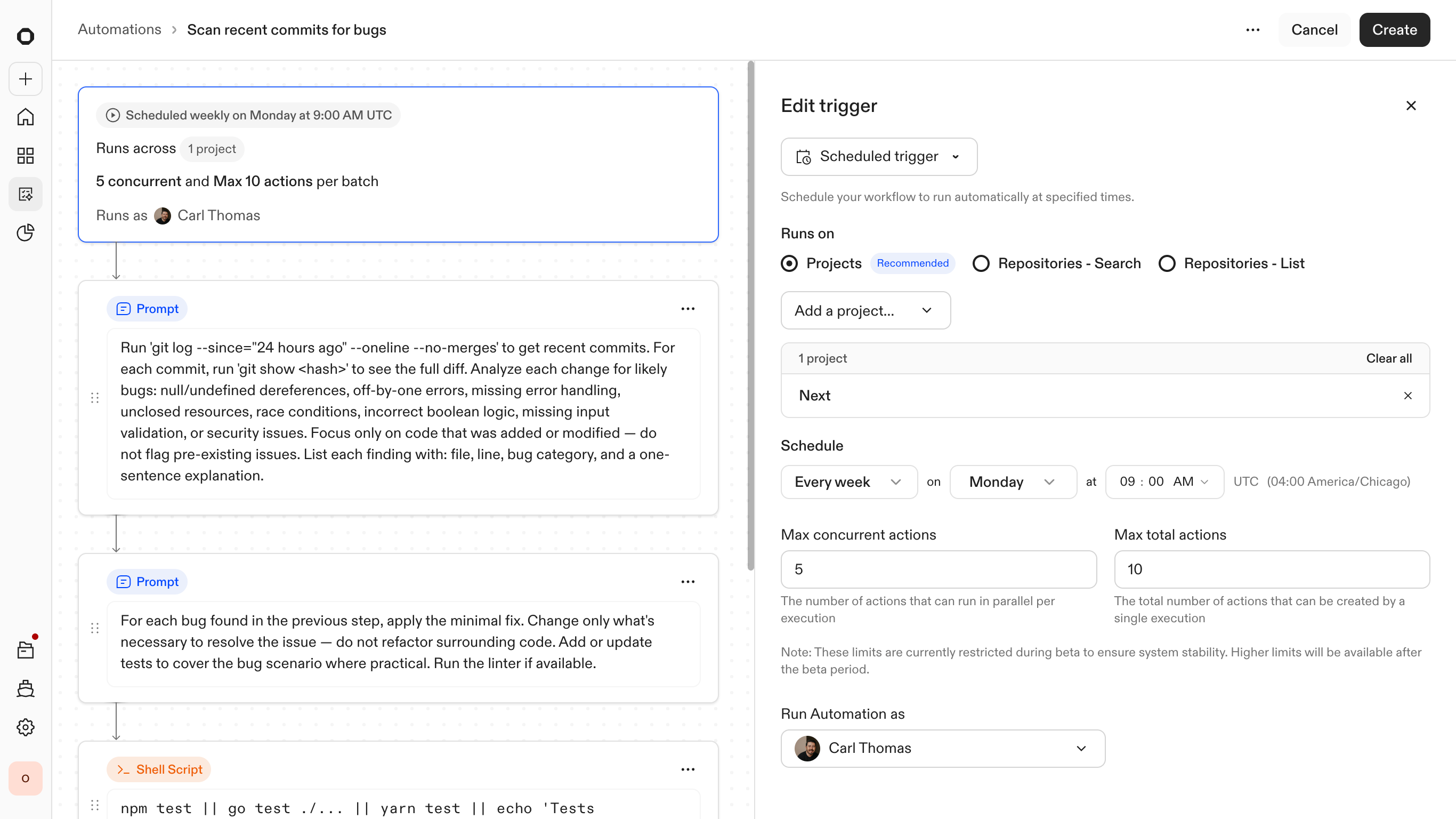
Setting context — which projects and repositories are in scope
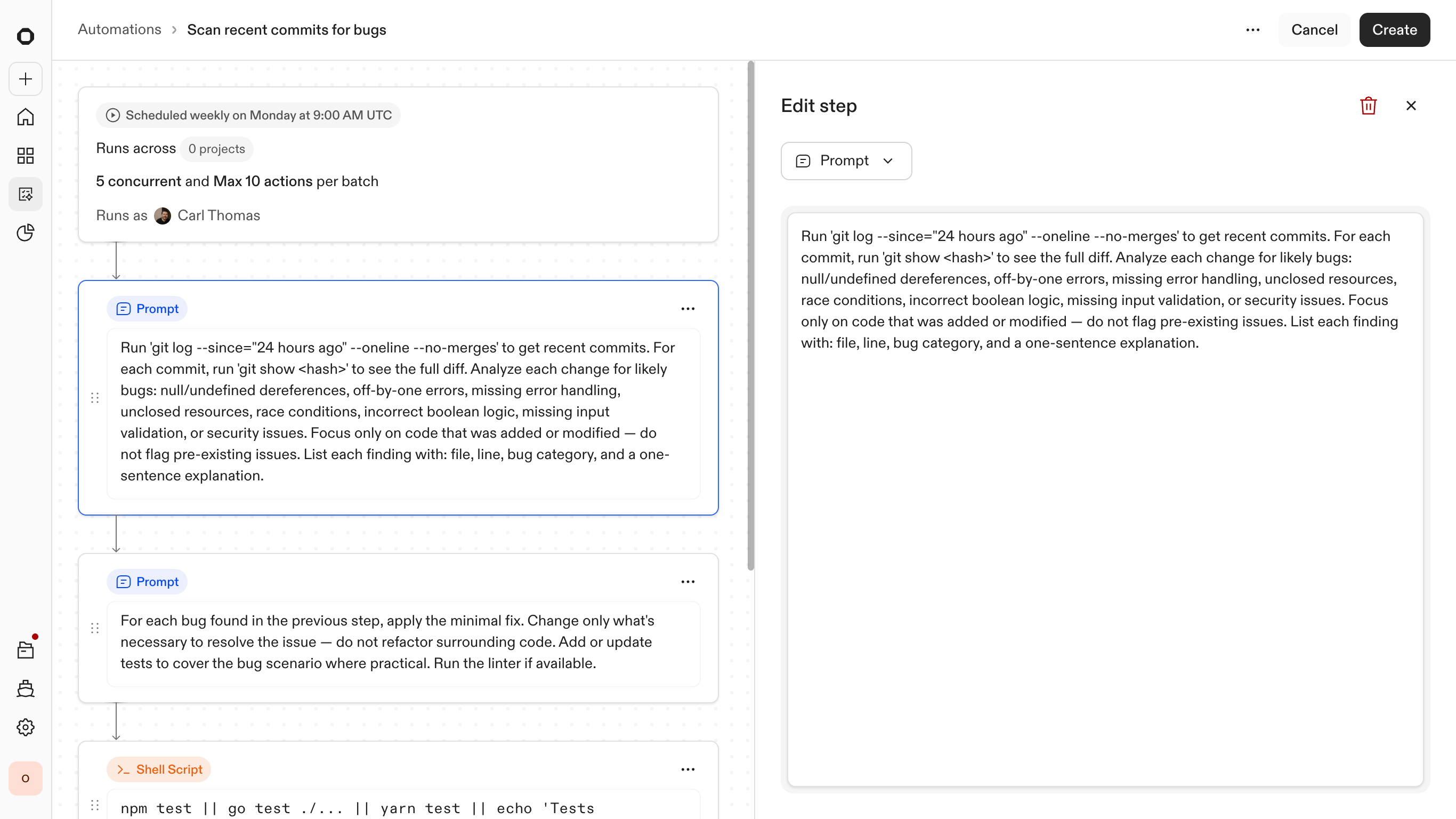
Composing steps — mixing agent reasoning with deterministic script execution
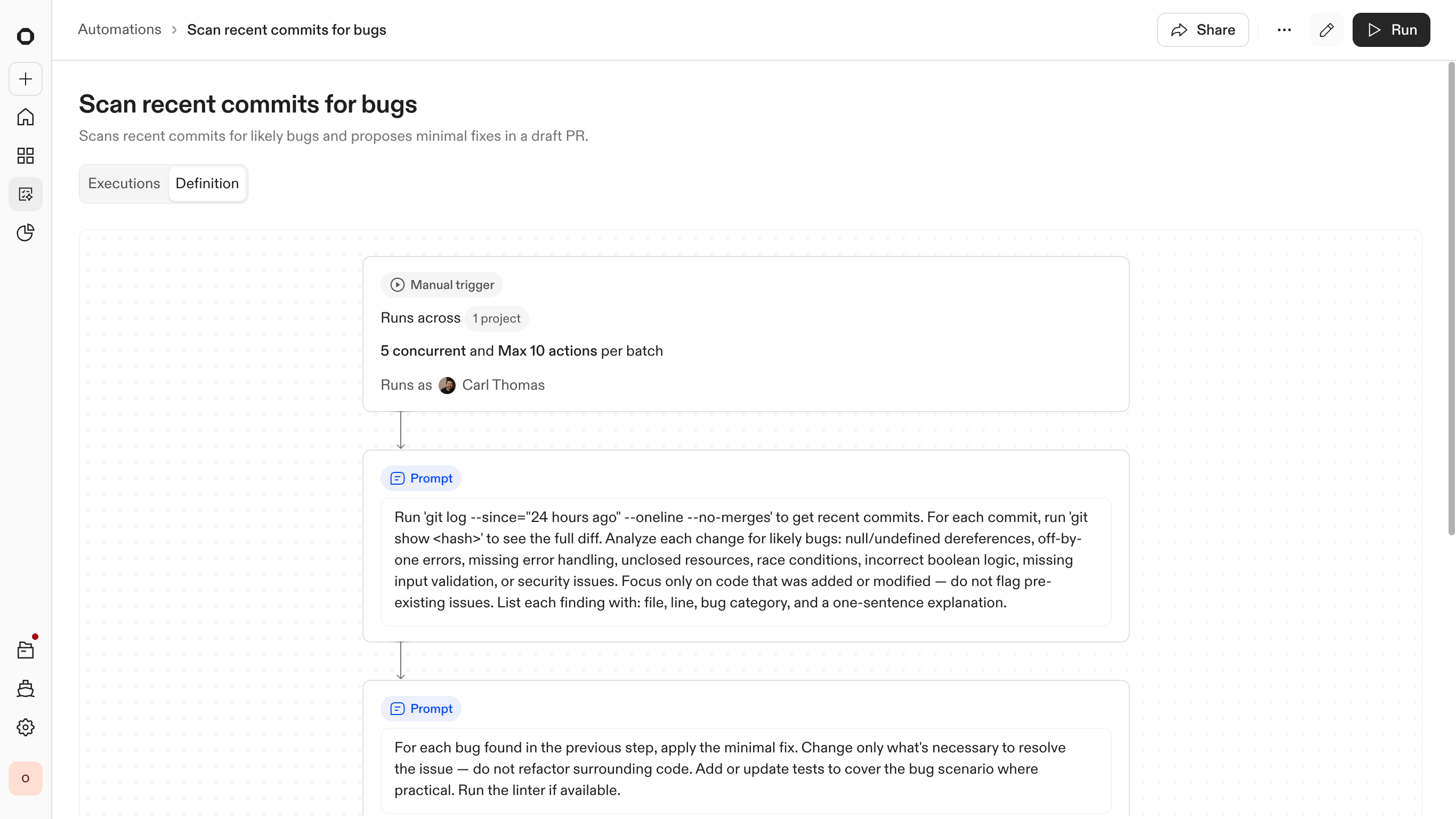
Automation configured and ready to run across the selected repositories
To make this predictable at scale, the entry point is built around reusable templates. Instead of only starting from a blank canvas, engineers can draw on a library of pre-configured workflows for common tasks such as library upgrades or security patches. Users can then adjust the trigger and any steps to match their company's needs.
This creates a "low-floor, high-ceiling" experience. It is simple enough to launch a standard fix in seconds, yet structured enough to enable deep customization of the underlying logic when a rollout gets complex.
Agents and scripts, working together
Agents are strong at reasoning but are not reliable execution engines on their own. To solve for this, I designed the system to combine agent-driven reasoning with deterministic execution steps. This includes shell commands, unit tests, and CI checks that behave consistently regardless of the repository context.
This hybrid approach creates a clear boundary between flexibility and control. By anchoring the agent's work in hard validations, the system can scale to 1,000 repositories without becoming unpredictable. If a deterministic check fails, such as a broken build or a failed test suite, the automation stops immediately. The LLM provides the solution, but the infrastructure provides the safety.
Managing executions
At scale, showing every successful log is just noise. I designed the reporting to treat success as the baseline and aggressively surface only the 10% that need attention. Whether it is a broken CI pipeline or a merge conflict the agent could not resolve, these outliers are promoted to the top of the list. This turns a multi-week manual audit into a 20-minute triage session.
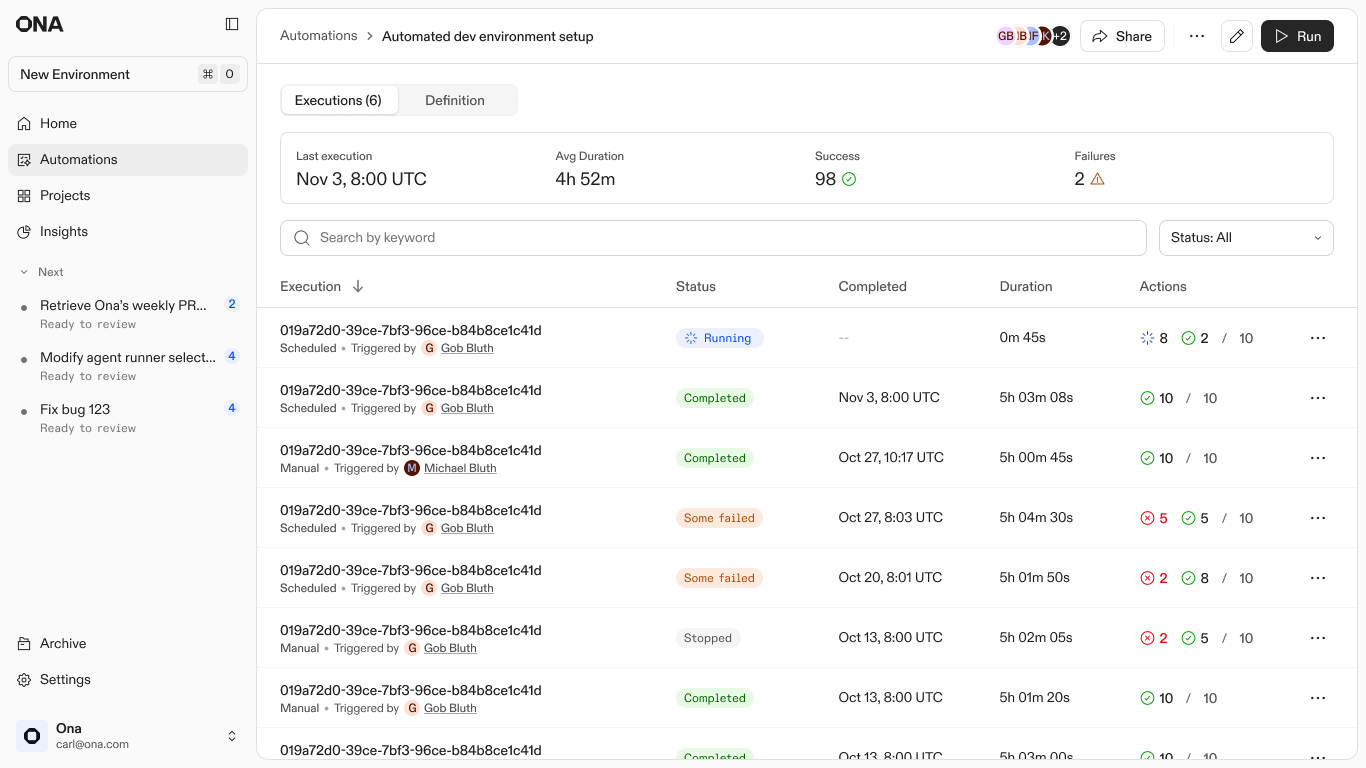
Execution list: Statuses of all current and previous executions
Execution reports and sampling
Once an automation finishes across hundreds of repositories, the challenge shifts from "can this run" to "how do I know it won't break production?"
Early adoption data reflected a clear confidence gap. While the system was technically capable of global rollouts, teams initially limited runs to a handful of repositories. Early trigger volume was low as teams cautiously tested what the system would actually do. Teams weren't hitting technical limits. They just had no visibility into what was actually happening across all those repositories.
I designed the Execution Reports to close this gap. By introducing sampling, the UI surfaces representative runs first. This allows engineers to validate agent behavior and command outputs in real-time before committing to a full-scale merge. As that visibility became the baseline, monthly automation volume grew 9x from launch to month five. Providing a verifiable history turned the system from an experimental tool into a trusted part of the daily engineering workflow.
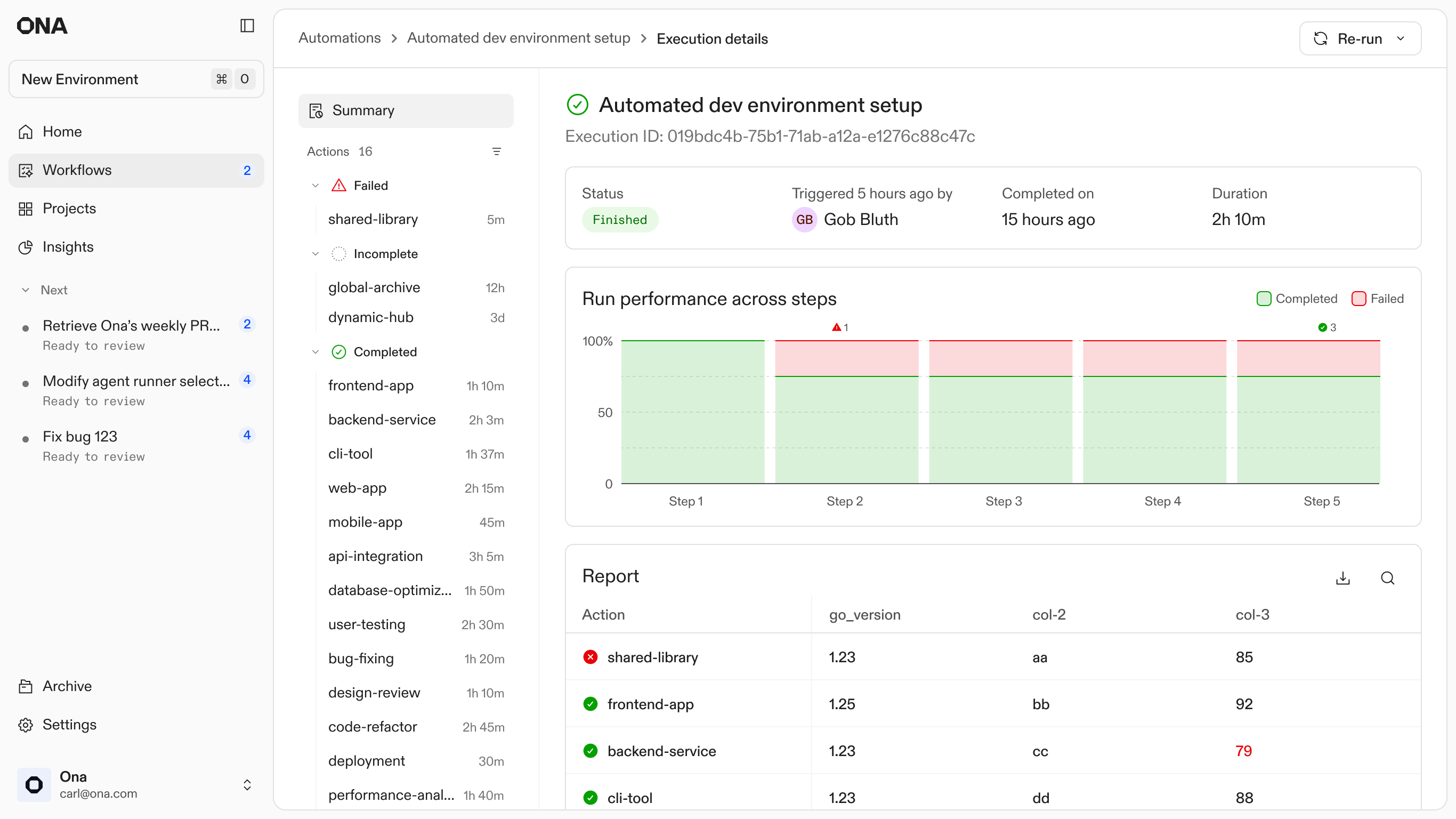
1. Execution Report: viewing runs and their status
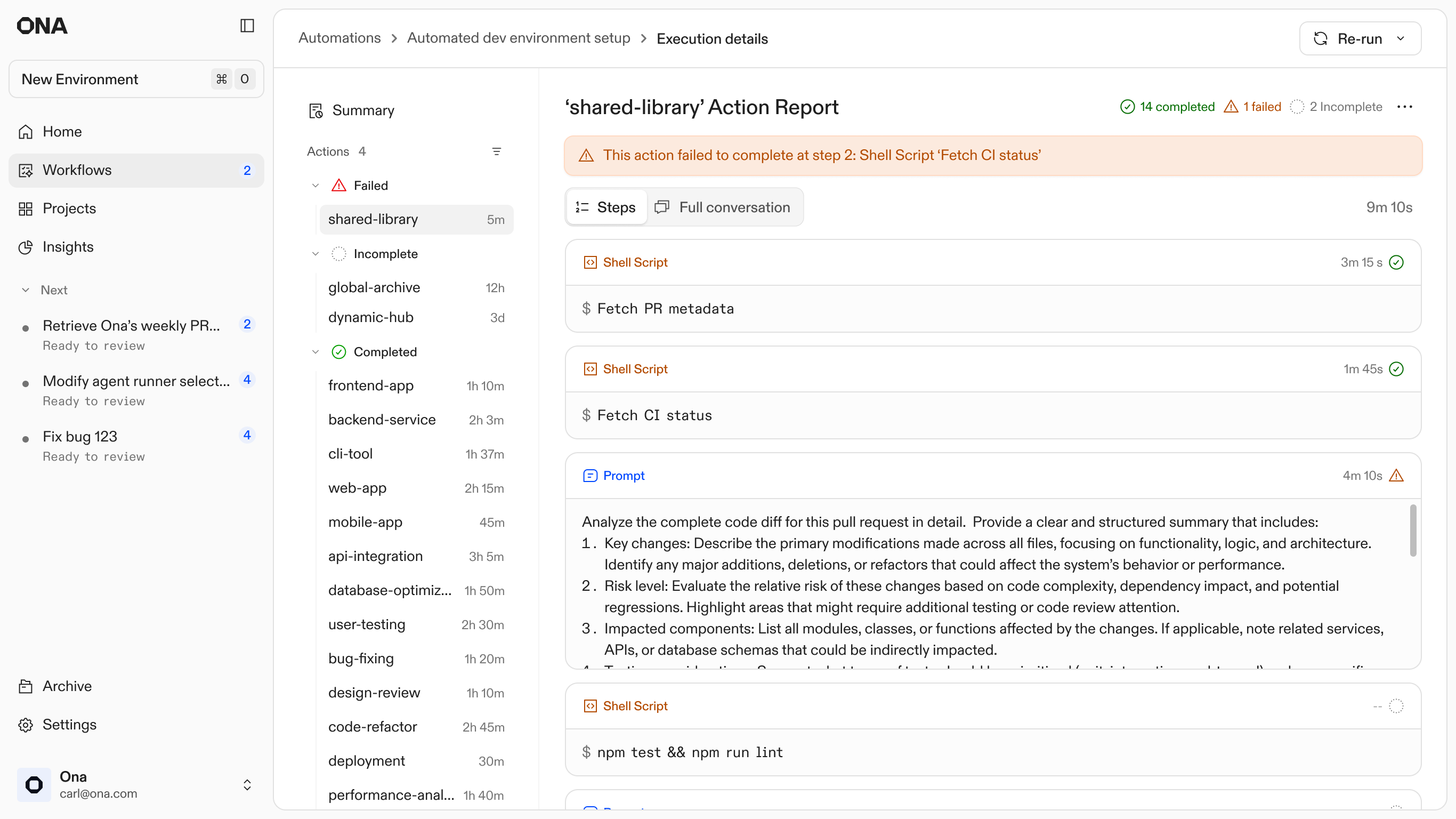
2. Execution Report: Drilling into a failed execution
Debugging with Ona
Failures are inevitable at scale, so the design treats them as entry points rather than dead ends. Every automation step runs in an isolated environment. When an agent gets stuck or a build fails, the system preserves that specific state and surfaces a unique Action ID.
I designed this hand-off to allow engineers to step directly into the context where the agent stopped. By entering the Action ID into a new Ona conversation, the user can inspect the full logs, see exactly where the logic diverged, and manually unblock the process. This shifts the engineer's role from babysitting scripts to performing high-level triage on the few cases that require human judgment.
1. Execution Report: Failed action and its steps
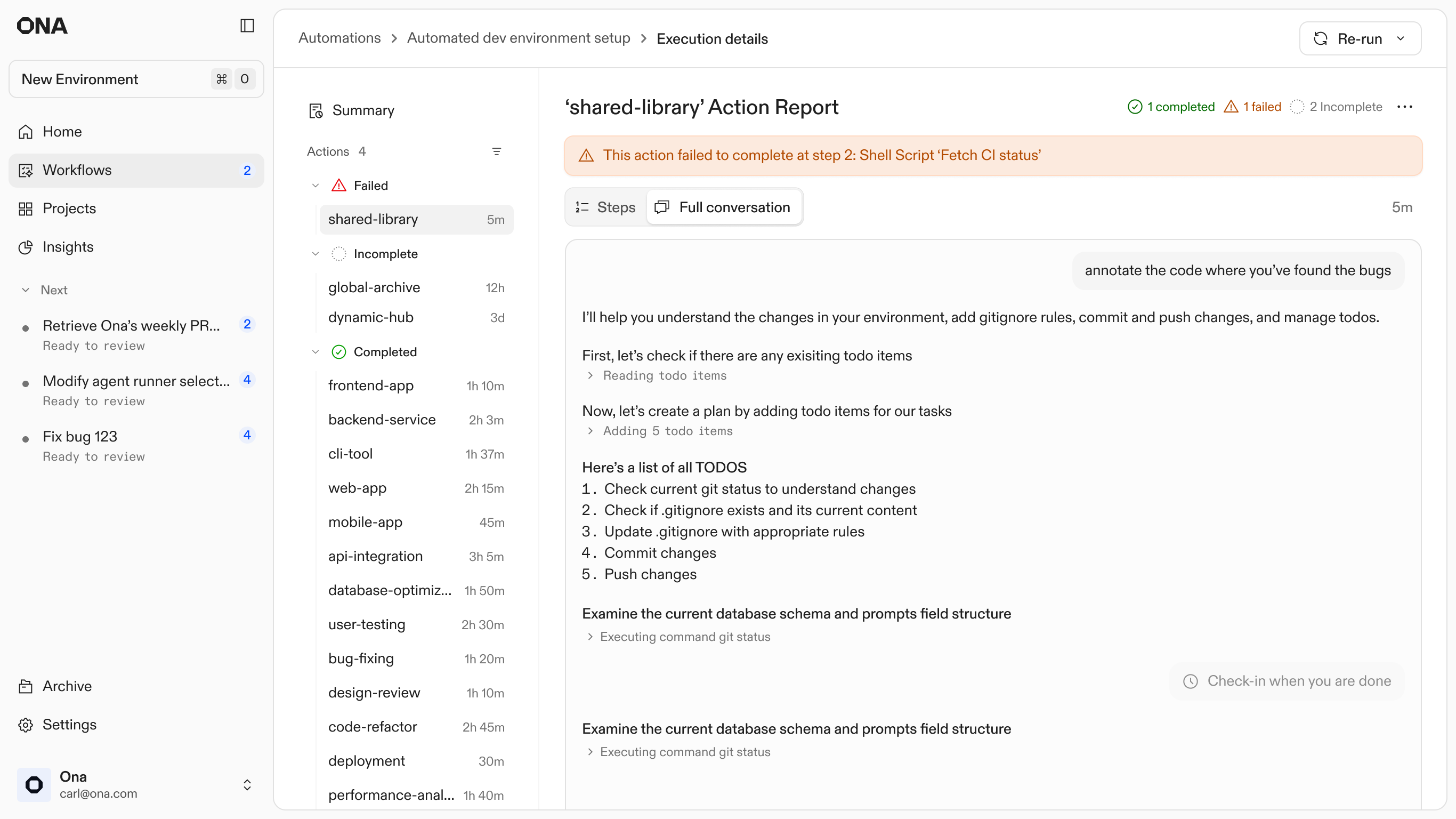
2. Execution Report: Failed action and it's full conversation
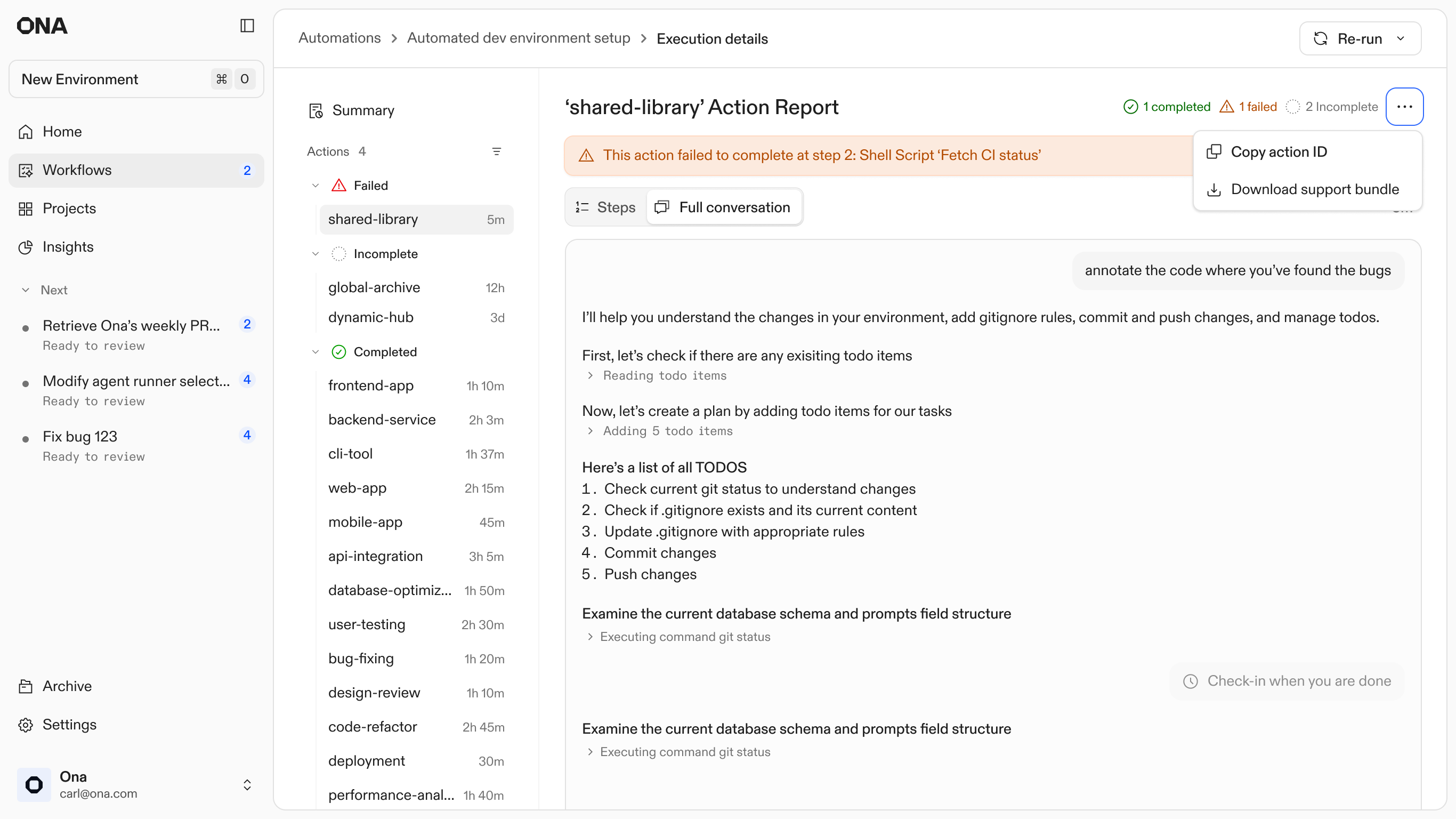
3. Execution Report: Failed action - Copying the action ID
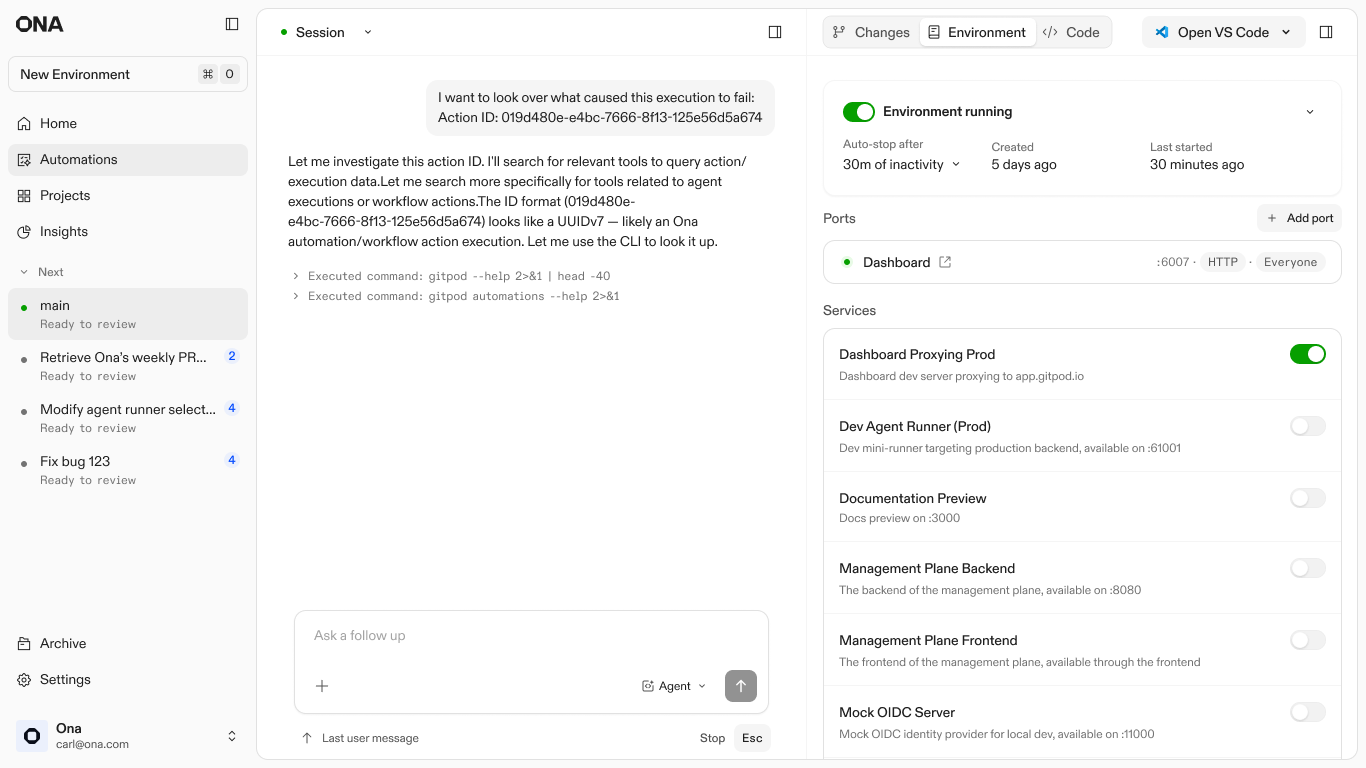
4. Conversation: Using the action ID in an Ona conversation to troubleshoot
Reducing the cost of starting
As Automations became more powerful, a bottleneck emerged at the start of the user journey. Even when engineers understood the underlying model, the perceived risk of a misconfigured global run was too high. The hesitation was not about technical capability; it was about the confidence to execute across 1,000 repositories without a safety net.
I saw a strategic opportunity to transition the entry point from a blank canvas to a library of verified templates. Instead of asking users to define an automation from scratch, the system provides pre-configured patterns for common workflows, such as dependency upgrades, PR reviews, and release notes. These act as "known-good" configurations that teams can adapt to their specific context.
Templates also gave Ona a way to embed expertise directly in the product. Common patterns come pre-configured by the people who know the system best. Engineers get a running start, and the flexibility is still there when they need to go deeper.
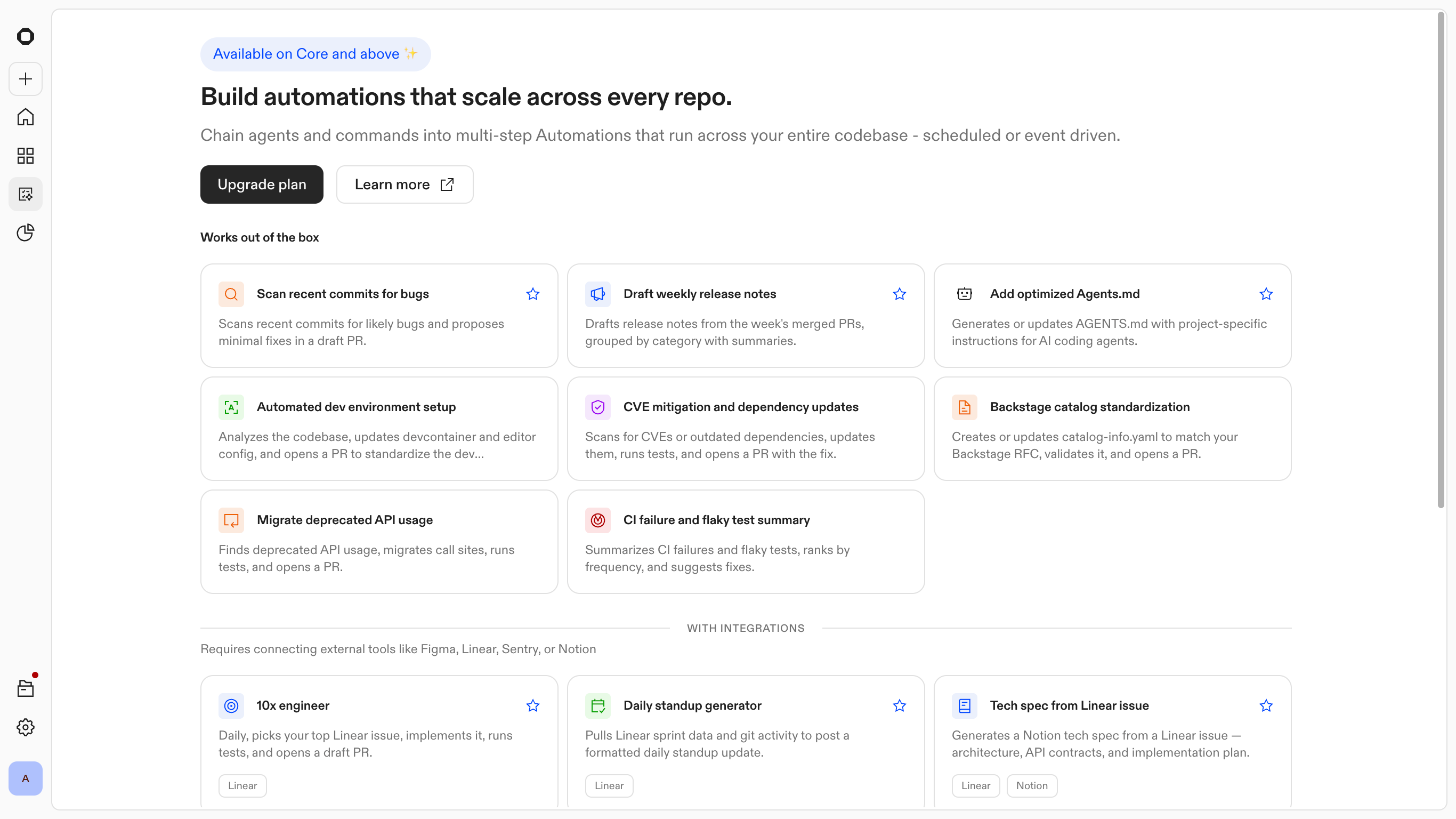
Automations: Templates and suggestions
Kingland Case Study: Accelerating onboarding and productivity
The true value of the platform shows up in a high-scale migration. Kingland had a 15-year legacy codebase and needed to roll out a Jest v30 migration across hundreds of repositories. Previously that kind of work required around five hours of focused engineering effort per repository.
Using Automations, they defined the target repos, composed the steps, and ran the change in parallel. The migration completed in 30 minutes. The same engine that handled Jest also got used for agent-generated JavaDocs, SQL optimization, and documentation work by non-engineering teams, which was not something the original design anticipated.

Ona Case Study
How Kingland accelerates onboarding and productivity with Ona
Outcomes
Automations matured from a high-touch creation tool into a background layer of the engineering workflow. Over the first four months, trigger volume grew 10x and the intervention rate stayed under 2%. Engineers went from running cautious five-repo tests to trusting the system with their full codebase.
Output split
The platform branched its output based on the specific engineering intent:
- •849 pull requests were opened to execute active changes.
- •2,291 reports were surfaced to provide oversight on existing workflows. The majority of the value came from the agent performing continuous health checks and surfacing visibility, not just writing code.
Human involvement
Out of 36,000+ triggers, only ~457 runs required human intervention. By surfacing only the outliers, the platform turned a multi-week manual audit into a 20-minute triage session. Engineers stopped babysitting every run and started supervising the results.
Growth reflects trust
Monthly automation volume grew 9x from launch to month five. What started as cautious experimentation became part of the daily engineering workflow.
What engineers actually used it for
We built the templates around library upgrades and security patches. That turned out not to be how people used it.
65% of executions, over 10,000 runs, were code review. Not CVE fixes or compliance patches. Engineers found a way to run Ona on every PR and just kept doing it.
88 organizations skipped templates and built from scratch, adapting the primitives to workflows we hadn't anticipated.
That shifted the roadmap. Continuous background review became the next thing to design for.
Note: Metrics reflect internal engineering usage where full system visibility and telemetry were available to measure end-to-end impact.
Reflection
Automations presented an interesting challenge for the team and myself. We needed to build trust through autonomy and parallelism. If done right it would make every decision have downstream effects across hundreds of repositories.
- •Trust comes from legibility. When the system runs autonomously across hundreds of codebases, engineers need to see what happened and whether they should care. That was harder to design than any individual feature.
- •Migrations make for a compelling demo. Code review was what people actually ran every day. The templates that felt like small utilities turned out to be the ones that stuck.
- •Excitement doesn't equate to action. In production, customers were still hesitant to run automations at full scale. Model variance and the stakes of parallel changes create real friction. Automations moves the vision forward, but closing that gap is the real work.
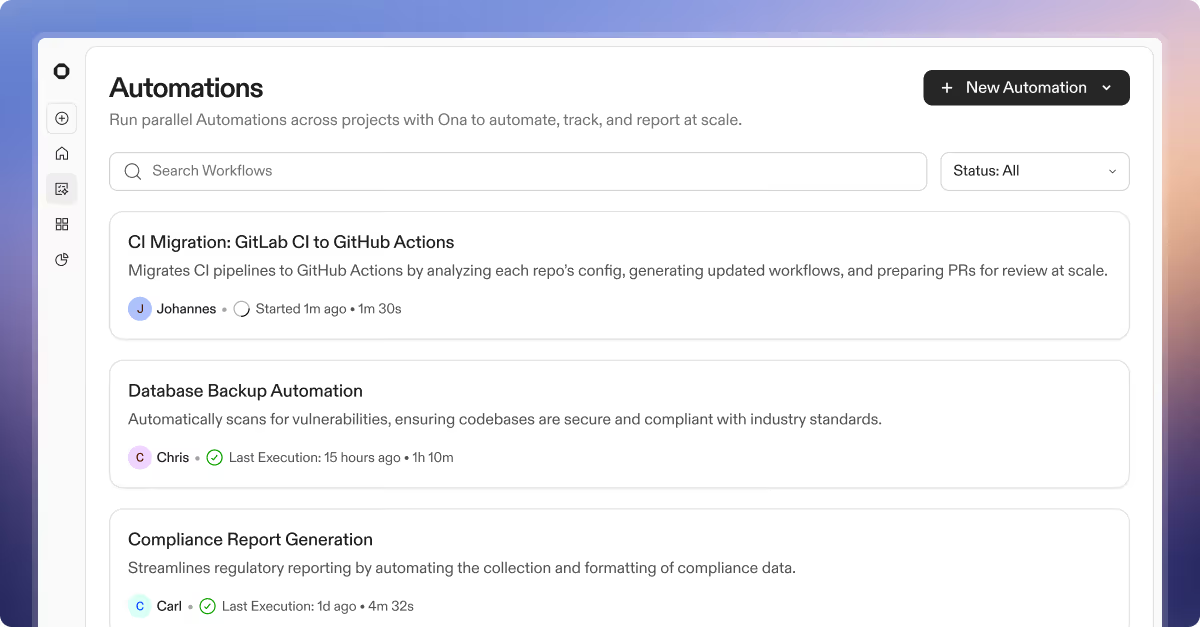
Launch announcement
Introducing Automations
Ona blog
Designing Automations